The MCP server lets an AI agent such as Claude, ChatGPT, Cursor or Codex work with your forms for you. By the end of this guide your agent will be connected and signed in, and you can ask it to build a form, publish it or tell you what people answered.
What the MCP server does
Once it’s connected, the agent works as you, on your plan and your forms. You ask in plain words and it picks the right tool, so you don’t need to name them. The server offers tools for:
- Forms: list, find, read, create, update, duplicate, publish or unpublish, delete, and check a form document without saving it.
- Versions: see earlier versions of a form and put one back.
- Submissions: search, read, summarize, tag, mark as read or spam, delete, and export to CSV.
- Analytics: views, conversion, abandonments and drop-off per field.
- Account and sharing: your account, embed snippets, form links, and where a form sends its submissions, with the last error, so the agent can tell you why submissions aren’t arriving.
- Search and fetch: find forms by title and submissions by their answers or tags, then read one in full. Both are read-only, and ChatGPT deep research and company knowledge use nothing else.
For an agent that has never seen Forminal, the agent instructions explain the platform, the tools and the form format in plain text.
Connect your client
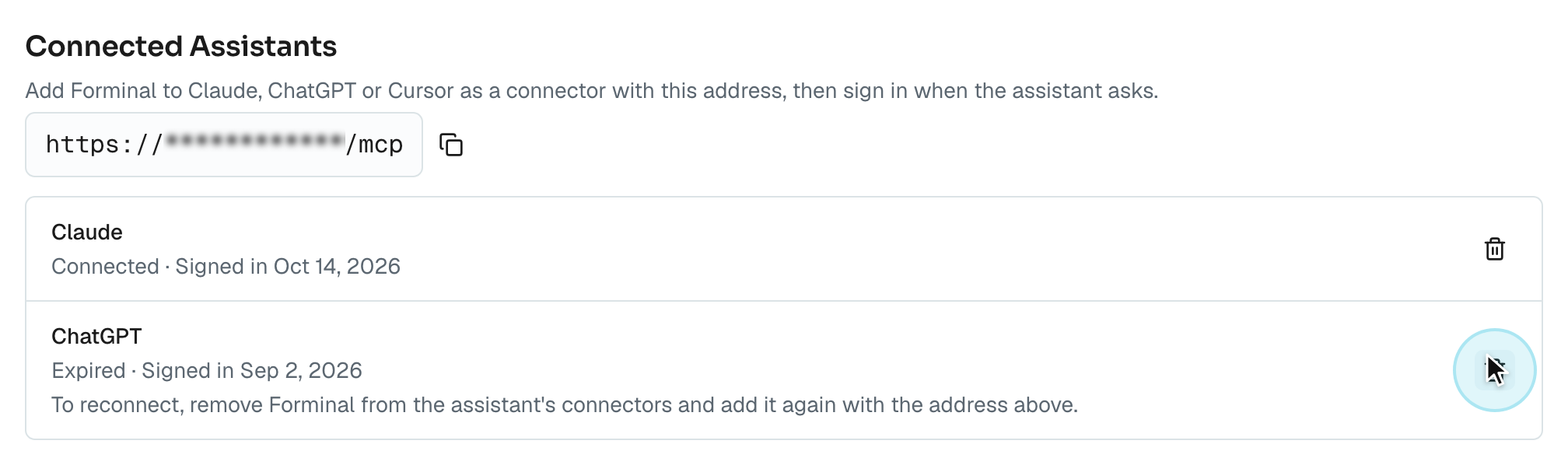
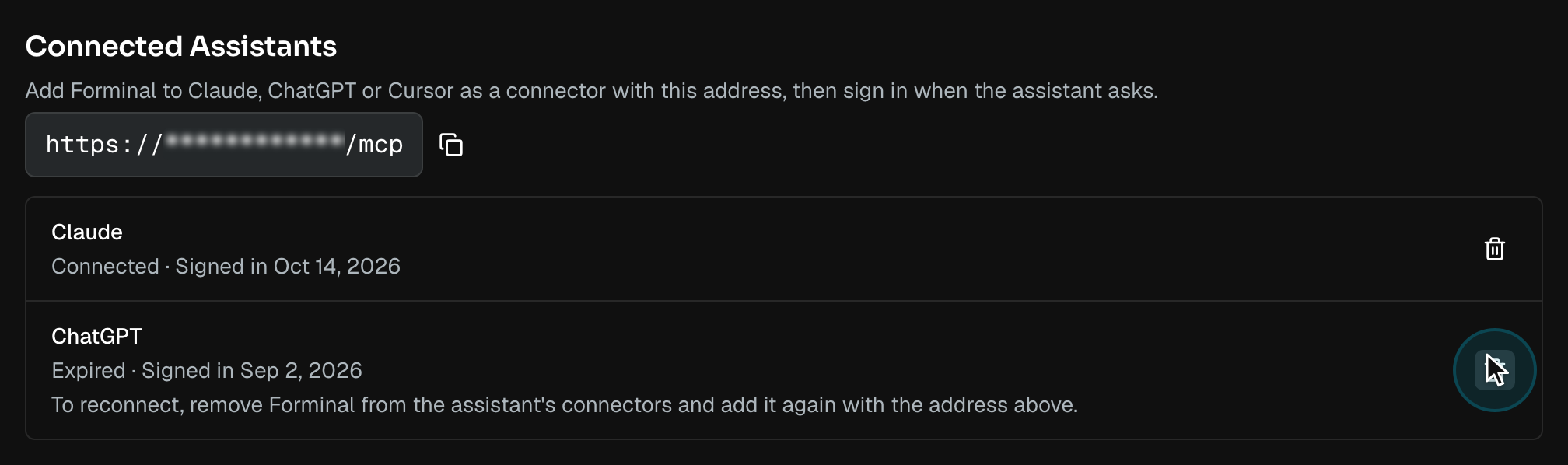
Every client uses the same server address. Copy it from your account:
- Open Account menu » Profile » API keys.
- Under Connected Assistants, select Copy MCP address.
In the commands below, put the address in place of MCP_ADDRESS. Connect your AI has the steps for each client, with the address filled in.
In Claude or ChatGPT:
- Add the address as a custom connector in Claude’s settings, or as a custom MCP server under Plugins in ChatGPT.
- A browser window opens. Sign in to your account, or create one, and allow access.
- Ask the agent to list your forms. An empty list on a new account still means you’re connected.
A Claude connector you add once works in chat, Cowork, Projects and the Claude mobile apps. The ChatGPT plugin works in chat, deep research, company knowledge and Codex. The Claude guide and the ChatGPT guide name each menu and button.
Cursor reads the server from its mcp.json file instead. The Cursor guide has the entry to add and how to sign in.
In Claude Code, add the server, then run /mcp in your session, pick forminal and sign in in the browser it opens:
claude mcp add --transport http forminal MCP_ADDRESSIn Codex CLI, add the server, then log in. The second command opens the browser sign-in:
codex mcp add forminal --url MCP_ADDRESS
codex mcp login forminal
In Gemini CLI, add the server with this command. If no browser tab opens when you start a session, run /mcp auth forminal in it to sign in:
gemini mcp add --scope user --transport http forminal MCP_ADDRESSVS Code reads the server from .vscode/mcp.json in your project. Add this entry, then sign in to your account in the browser window that opens:
{ "servers": { "forminal": { "type": "http", "url": "MCP_ADDRESS" } } }Kiro, Cline and other clients that connect a remote MCP server over streamable HTTP, with a browser sign-in or an API key, use the same address. The Forminal MCP repository on GitHub also has install files that set the address up for you:
- Claude Code plugin: run
/plugin marketplace add awesomemotive/forminal-mcp, then/plugin install forminal@forminal. - Codex plugin: run
codex plugin marketplace add awesomemotive/forminal-mcp, then run/pluginsin Codex, install Forminal from the forminal marketplace and start a new session. - Gemini CLI extension: run
gemini extensions install https://github.com/awesomemotive/forminal-mcp. - Kiro power: open Powers, select Add Custom Power » Import power from GitHub and paste the repository URL.
- Cline: ask Cline to install Forminal from the repository. It follows the install steps in the repository’s
llms-install.md.
You still sign in through the browser the first time the client connects.
Signing in through the browser is the usual way, and you never paste a secret into the agent. For an agent that runs with nobody there to sign in, send an API key as an Authorization: Bearer header instead.
Connect from the form builder
Open an empty form in the builder, select Build With Your Agent and then Copy Setup Prompt, and paste the prompt into your agent. The prompt holds the server address and the form’s id, so the agent connects, asks you to sign in the first time and then works on the form you have open. Describe the form you need. Each change the agent saves shows up in the builder without a reload, with a short note saying what changed.
Good to know
- The Connected Assistants list shows each assistant as Connected or Expired, with the day it signed in. Select Disconnect, the bin on its row, to remove one. To reconnect an expired one, remove the connector in the assistant and add it again, reconnect Forminal under Plugins in ChatGPT on the web, run
/mcpagain in Claude Code, or run/mcp auth forminalin Gemini CLI. - Every tool that creates, changes, publishes or deletes something takes an
ackargument, the acknowledgement code from llms.txt, which the agent gets by reading that file or callingget_agent_instructions. - Deleting forms or submissions takes two steps: the agent first gets a summary of what would go, and should only delete after you agree. Nothing brings them back.
- Editing a published form keeps it published, and the form as it was before each edit is kept as a version you can restore.
- If you ask for a feature your plan doesn’t include, the change is saved and the agent tells you what the published form does instead, with a link to the plans on the pricing page.
- Each tool tells your client whether it only reads or changes something, and whether the change deletes or replaces what’s there, so a client such as ChatGPT can ask you before a change.
- Analytics tools need a plan that includes Form Analytics. See the pricing page and the MCP Server page for the full tool list.
- After Build With Your Agent, the builder brings in the agent’s changes until 10 minutes pass with none, or for up to 30 minutes while the Build With Your Agent window stays open. The window closes by itself once the agent adds the first field. Once the builder stops looking, reload the page before you change anything, or your next save writes over what the agent did since.
- If the agent saves while you have an edit that hasn’t saved yet, the agent’s version wins. Undo brings your edit back.
Frequently asked questions
Which AI clients work with the Forminal MCP server?
Any client that connects a remote MCP server over streamable HTTP, with a browser sign-in or an API key. That includes Claude Code, Claude Desktop, claude.ai, ChatGPT, Cursor, Codex CLI, Gemini CLI, VS Code, Kiro and Cline, and they all use the same server address.
Can an AI agent delete my forms without asking?
Deleting takes two steps. The agent first gets a summary of what would go, and it should only go ahead after you agree. Deleted forms and submissions can’t be brought back.
How do I stop an AI assistant from reaching my account?
Open the API keys tab of your profile and select Disconnect next to the assistant under Connected Assistants. It loses access at once, and its next call is refused.
Why does my assistant show as Expired?
Remove the connector in the assistant and add it again with the same address. In ChatGPT, reconnect Forminal under Plugins on the web. In Claude Code, run /mcp again, and in Gemini CLI, run /mcp auth forminal. Only the assistant can start a new sign-in, so Forminal has no reconnect button.
Can the agent export my submissions?
Yes, as a CSV. The export link works for 15 minutes for anyone who has it, and it covers up to 20,000 submissions.
Can the agent work on forms in a workspace shared with me?
Yes, with the access the owner gave you. If that workspace requires two-factor authentication and you haven’t turned it on, the MCP server refuses those forms.
Which tools does ChatGPT deep research use?
Deep research and company knowledge use only search and fetch. Search returns forms whose title matches and up to 20 submissions from the newest 5,000 on each of your 10 most recently changed forms, and fetch reads one of them in full.
Is there a Forminal plugin for Claude Code or an extension for Gemini CLI?
Yes. The forminal-mcp repository on GitHub has a Claude Code plugin, a Codex plugin, a Gemini CLI extension and a Kiro power. Each one connects to the same server address, and you still sign in through the browser.