Un sondaggio Net Promoter Score pone una domanda: quanto è probabile che tu ci raccomandi a un amico o collega, da 0 a 10. Il punteggio da solo non ti dice cosa correggere, quindi la parte utile è ciò che chiedi alle persone che ti danno un punteggio basso. Questa guida crea un sondaggio NPS che chiede ai detrattori cosa è andato storto, invia un'email al tuo team per ognuno e grafici i risultati.
Aggiungi la domanda NPS
- In the builder, select Add Field and, under Rating and Ranking, choose Net Promoter Score. On an empty form, select Start from Scratch instead of Add Field.
- L'etichetta inizia come “Quanto è probabile che tu ci raccomandi a un amico o collega?”. Sostituisci “ci” con il nome del tuo prodotto, se vuoi.
- Lascia la scala da 0 a 10 a passi di 1. La divisione in promotori e detrattori presuppone tale scala, quindi una diversa ti dà un numero che non puoi confrontare con l'NPS di nessun altro.
- On the Advanced tab, check the labels under the scale. Start Label (“Not likely at all”) and End Label (“Extremely likely”) are on, and Center Label is off. Each can be up to 50 characters.
- Leave Default at None, so nobody’s answer is nudged toward a number.
Turn on Required on the General tab if the score is the point of the survey. Someone who skips it then sees “Pick a score”.
Chiedi ai detrattori cosa è andato storto
I punteggi da 0 a 6 sono detrattori, 7 e 8 sono passivi, e 9 e 10 sono promotori. Poni una domanda di follow-up ai detrattori e lascia stare tutti gli altri:
- Aggiungi un campo Testo lungo sotto la domanda NPS, con un'etichetta come “Cosa potremmo fare meglio?”.
- Select it and open the Smart Logic tab in its settings.
- Turn on Enable Conditional Logic and choose Show in the “this field if” line.
- Under Select a field, pick the NPS question, choose less than, and pick 7.
The question now appears only for scores of 6 or less. A hidden field isn’t required, and its answer is left out of the submission, so a happy customer never meets a box they have to skip. You can do the same for promoters, for example showing “Would you leave us a review?” when the score is greater than 8.
Per provare le regole, passa dall'editor a Desktop, Tablet o Mobile e compila l'anteprima. L'anteprima non salva nulla e non invia email.
Invia un'email al tuo team per ogni punteggio basso
- Select Form Settings in the top bar, then Notifications, and select Add Notification.
- In To, type the address of whoever follows up with unhappy customers.
- If the survey asks for an email, open Reply To, type @ and pick the Email field, so a reply goes straight to the customer.
- Scrivi un oggetto come “Punteggio NPS basso”. Digita @ per inserire il punteggio stesso.
- Turn on Enable Conditional Logic, choose Send “this email if”, and set the NPS question to less than 7.
L'email elenca ogni risposta, incluso il follow-up, e viene inviata solo per i detrattori. Ricevi un'email per ogni invio copre il resto del compositore.
Leggi i risultati
Ogni punteggio viene visualizzato nella pagina Invii, nell'esportazione CSV e nelle email di notifica come numero scelto.
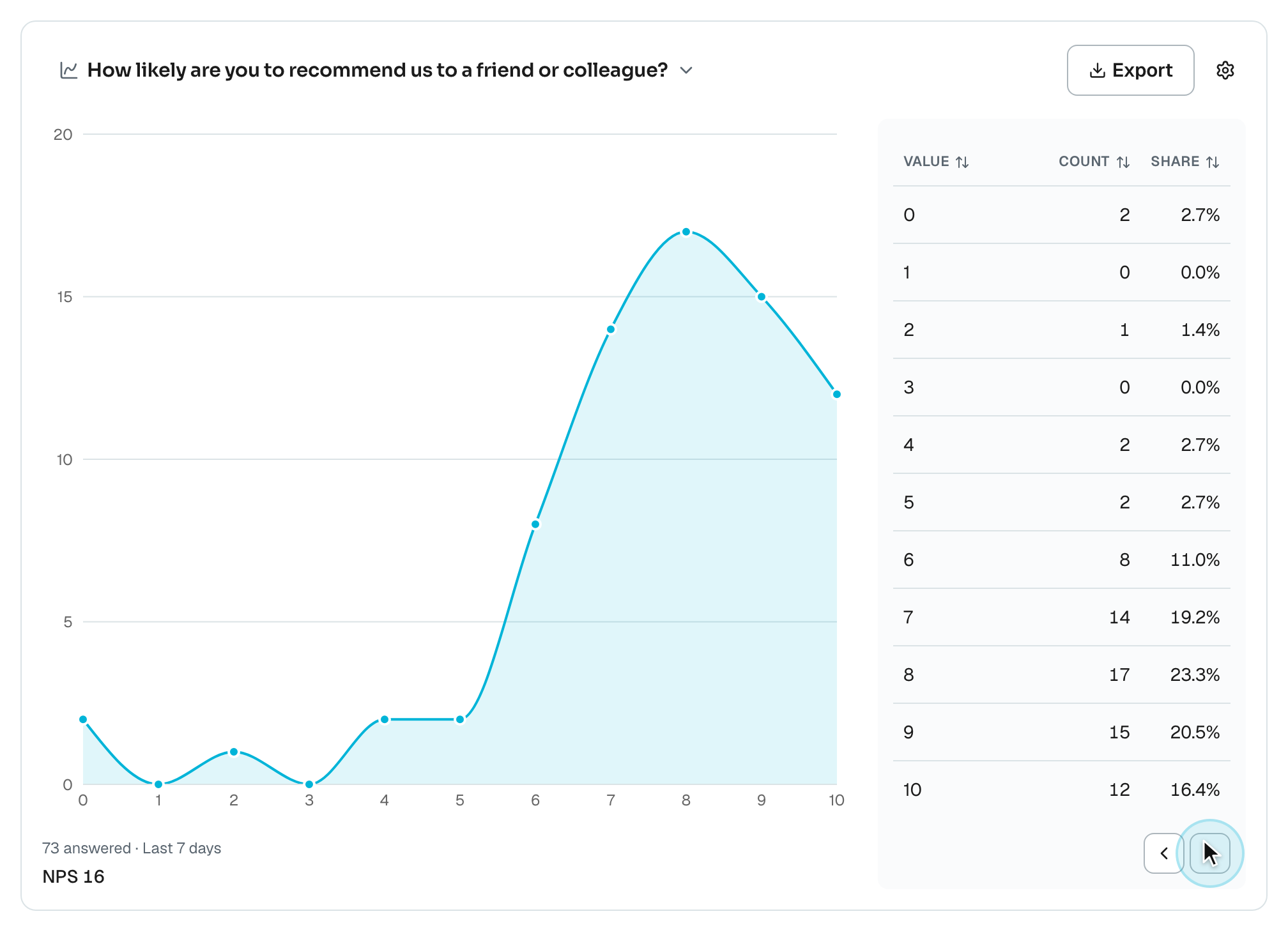
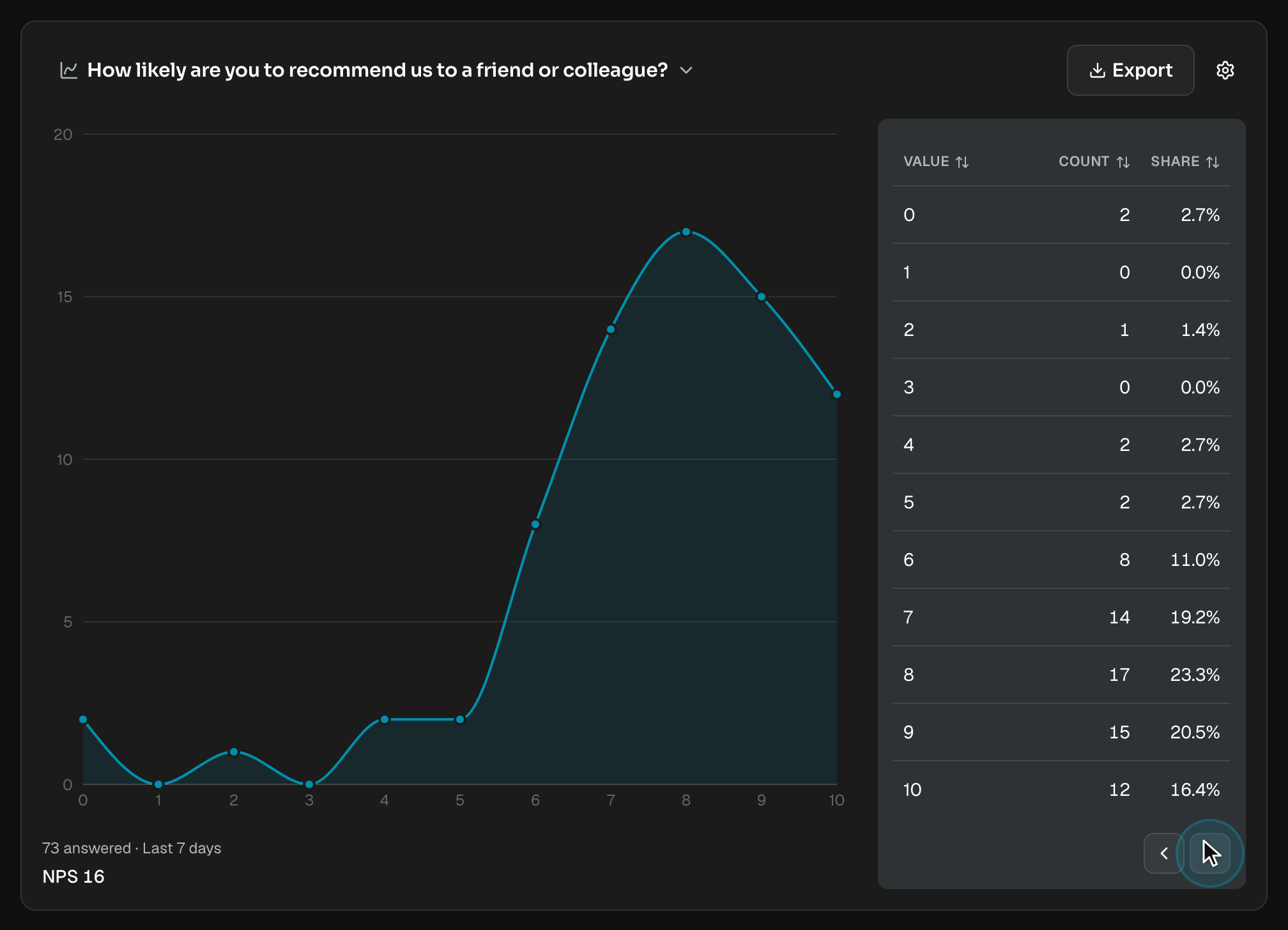
On Pro and Business, the Analytics page does the arithmetic. Select Analytics next to the form’s title in the builder and, under Charts, pick the NPS question. The chart has one point for each score from 0 to 10, with your Net Promoter Score under it: the share of promoters minus the share of detractors. As a pie it’s three slices, detractors, passives and promoters. In Chart settings, turn on Compare to previous period to see whether last month’s changes moved the score, and use Export to download the chart as a JPG or a PDF.
Su Lite, la pagina Analisi mostra lo stesso grafico con numeri di esempio inventati, così puoi vedere cosa otterresti. Ogni risposta viene conservata e il grafico reale è disponibile una volta effettuato l'aggiornamento.
Suggerimenti per un sondaggio NPS migliore
- Mantienilo breve: il punteggio, la domanda di follow-up e forse un'altra domanda.
- Per sapere chi ha dato un certo punteggio senza chiederlo, passa un ID cliente nel link che invii. Un campo nascosto lo raccoglie e lo memorizza con l'invio.
- Le etichette si trovano a sinistra, al centro e a destra sotto i pulsanti, quindi tienile brevi per gli schermi stretti dei telefoni.
- Lo spam non viene conteggiato nei grafici.
Ogni impostazione si trova nella pagina Net Promoter Score e i grafici sono trattati in Grafici di riepilogo delle risposte.
Crea un account gratuito e aggiungi una domanda Net Promoter Score al tuo prossimo sondaggio clienti.