This page lists what you can write in the formula of a calculation: the operators, the if syntax, every function with an example, what each field gives, and how empty values and dates behave. The Cheatsheet link under the Formula box in the builder opens it.
Examples
- Order total with 20% tax:
(@Price * @Quantity) * 1.20 - A text result:
concat(@First, " ", @Last) - Days until an event:
days(now("Y-m-d"), @EventDate) - A price by country:
if ( @Country == "Italy" ):
  @Nights * 50
elseif ( @Country == "Spain" ):
  @Nights * 30
else:
  0
endif;
Write a formula
Type @ to insert a field as a chip, or select Insert Field. Behind the chip the formula stores the field’s id, so renaming a field never breaks a formula. Everything on this page also works in the Formula box of a Short Text, Long Text, Number or Hidden field.
A formula is one or more statements. A statement is an expression or an if block. A ; after an expression is optional, and the value of the formula is the last expression worked out. A new line is only a space, so two expressions on separate lines need a ; between them. Without one, Validate Formula reports a syntax error.
Numbers and text
- Numbers use a dot for decimals:
1.20,.5. Write1.20, never1,20. - Text goes in single or double quotes:
"Spain",'Spain'. Inside the text, a backslash followed bynis a new line, followed byta tab, and followed by a quote mark or another backslash it types that character. - There are no
trueorfalsewords, and no variables. A condition gives 1 for true and 0 for false.
Comments
// noteand# noterun to the end of the line./* note */can span lines.
Operators
From the one that binds loosest to the one that binds tightest:
||or&&and==and!=<,<=,>and>=+and-*,/and%!and a minus sign in front of a value (-@Discount)- Parentheses
( )
This is normal math order, so 2 + 3 * 4 is 14. Use parentheses to group.
+ - * / %work on numbers.+never joins text. Useconcatfor that.%is the remainder, and it follows the sign of the second number:-7 % 3is 2.+,-,*and%round to the most decimals among their operands, so0.1 + 0.2is 0.3./and the math functions round to 12 decimals.==,!=,<,<=,>and>=give 1 or 0.&&,||and!also give 1 or 0.!turns a true value into 0 and a false one into 1.
If, elseif and else
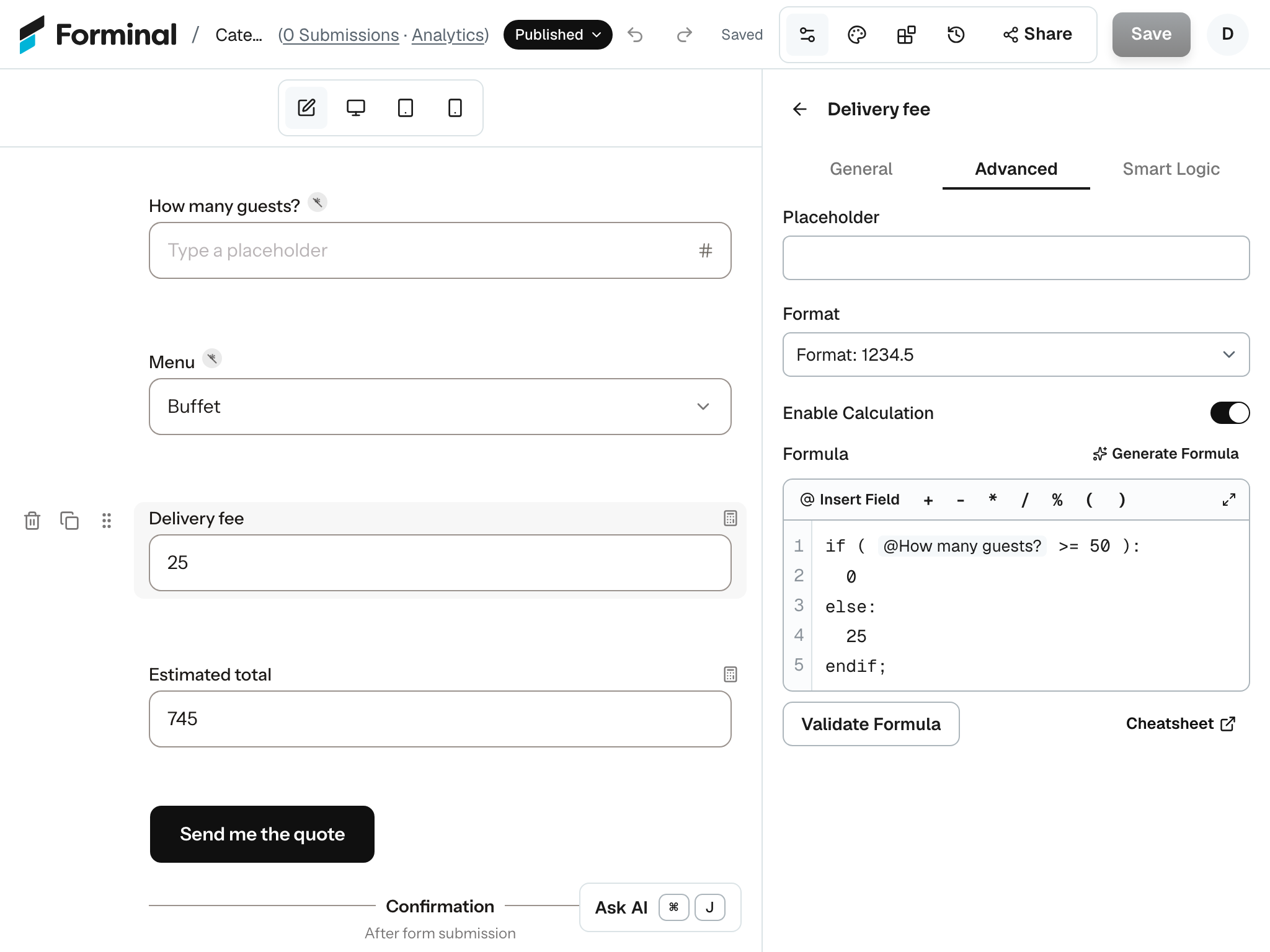
if ( condition ):
  value
elseif ( other condition ):
  other value
else:
  fallback
endif;- The colons are required.
endiftakes an optional;. - You can nest blocks and use any number of
elseif. - The
elsepart is optional. When no condition matches and there is noelse, the formula gives empty.
Functions
Function names are lowercase, and the number of arguments is checked when you validate. In the lists below, an argument with = has a default you can leave out, and ... means more arguments of the same kind.
Math
abs(x): the value without its sign.abs(-5)is 5.average(x, ...): the mean.average(2, 3, 4)is 3.ceil(x): rounds up to a whole number.ceil(2.1)is 3.exp(x): e to the power of x.exp(0)is 1.floor(x): rounds down to a whole number.floor(2.9)is 2.ln(x): natural logarithm.ln(1)is 0.log(x): logarithm to base 10.log(1000)is 3.max(x, ...): the largest.max(2, 9, 4)is 9.min(x, ...): the smallest.min(2, 9, 4)is 2.pi(): 3.14159265359.pow(base, exp):pow(2, 10)is 1024.rand(min = 0, max = 2147483647): a random whole number from min to max.rand(1, 6).round(x, precision = 0): rounds half away from zero.round(2.4890, 2)is 2.49.sqrt(x): the square root.sqrt(16)is 4. A negative number gives empty.
Text
num(text, precision = 12): the first number found in the text, rounded.num("Test 10.12345678", 2)is 10.12.trim(text): removes spaces from both ends.trim(" hi ")ishi.truncate(text, length): the first characters.truncate("Hello world", 5)isHello.concat(a, ...): joins values.concat("Price", ": $ ", 99.99)isPrice: $ 99.99.join(separator, a, ...): joins values with a separator, skipping empty ones and keeping 0.join(",", "One", "Two", 3)isOne,Two,3.format_amount(amount, symbol = 1): writes an amount as money in the form’s payment currency, or in USD when the form has no Payment field.format_amount(1234.5)is$1,234.50, andformat_amount(1234.5, 0)is1,234.50.
Dates and time
now(format = ""): the current date and time. With no format it prints like2026-10-20 14:30.now("Y-m-d")prints the date only.date_diff(start, end, units = "days", format = ""): how many whole units lie between two dates.date_diff("01/01/2026", "15/01/2026")is 14.years(start, end, format = ""),months(...),weeks(...),days(...),hours(...),minutes(...)andseconds(...): shorthands fordate_diffwith that unit.years("15/06/1990", "15/06/2026")is 36.
The units for date_diff are years, months, weeks, days, hours, minutes and seconds. Months and years count calendar months and years. A date it can’t read makes the function give empty.
Debugging
debug(x, ...): gives 0 and writes its arguments to the browser console while you test. It does nothing on the server.
What a field gives
An @Field gives the value below. The parts are picked from the same list when you type @, and show in the box as @Field · Part, such as @Plan · Amount.
- Number: the number, or empty when blank.
- Short Text, Long Text, Email, Phone and Website: the text.
- Rating and Net Promoter Score: the chosen value as a number.
- Yes/No: 1 when ticked, 0 when not.
- Multiple Choice and Dropdown with one answer: the label of the chosen option.
@Plan · Amountis that option’s amount, or 0 when it has none. - Checkboxes and a Dropdown that allows several: the chosen labels joined with a comma and a space.
@Toppings · Amountadds up the amounts of the chosen options. Each option is also a part:@Toppings · Cheesegives the label “Cheese” when that option is ticked and is empty when it isn’t. - Name: the full name as the field shows it, and
@Name · First,@Name · Middleand@Name · Lastfor the parts the field’s format has. - Address: the full address as the field shows it, and one part for each part the address field has.
- Date and Time: the text the field stores.
- Hidden: the value from the form’s link, or its own formula’s result.
- A calculated field: its result.
Choice amounts come from Option Amounts, a toggle on the choice field’s Advanced tab that adds an amount box to each option.
A formula can’t read Ranking, File Upload, Signature, Payment, Content or Page Break fields, or its own field. Validate Formula says so. A field that Smart Logic hides counts as empty, and so does a field on a later page until it is answered. A field can read another calculated field, but two fields that calculate from each other can’t be published.
Empty values and conversions
A value is a number, text or empty.
- In arithmetic and the math functions, a number is itself, text gives the first number found in it (
"Test 10"is 10, and1,234.56reads as 1234.56), and empty or text with no number is 0. - A blank number compares as 0, so with an empty
@Qty,@Qty > 0is 0 and@Qty == 0is 1. Empty compared with text reads as empty text. - Two values that both read as numbers compare as numbers. Anything else compares as text, exactly, with capitals counting.
- Empty,
0and the text"0"are false. Everything else is true. - A division by zero, the square root of a negative number, or any other error makes the field empty. People don’t see an error on the form. Validate Formula shows the reason.
Dates
A date is read from a Date or Time field, or from text in one of these formats, alone or followed by a time as g:i A, H:i or H:i:s:
d/m/Y, as in 31/12/2026m/d/Y, as in 12/31/2026d-m-Yandm-d-YY-m-d, as in 2026-12-31d.m.YF j, Y, as in December 31, 2026
A date that fits both d/m/Y and m/d/Y, such as 01/02/2026, is read day first, as 1 February. Pass a format as the last argument to choose: days("01/02/2026", "15/02/2026", "m/d/Y").
Formats use these letters: d day with two digits, j day, m month with two digits, n month, Y four-digit year, y two-digit year, F month name, M short month name, D short day name, l day name, H and G hours on a 24 hour clock, h and g hours on a 12 hour clock, i minutes, s seconds, and A or a for AM or PM. A backslash prints the next character as it is.
now() always prints in UTC, in the browser and on the server, so both show the same time.
Random numbers and the current time
rand() and now() can’t give the same answer in the browser and on the server. The browser shows a preview while people fill in the form, and the stored value is the one the server works out when the form is sent.
Good to know
- A formula can be up to 10,000 characters long, including line breaks and comments.
round()andnum()keep at most 12 decimals.- A formula that doesn’t validate blocks publishing until you fix it.
- Calculations are available on every plan.
Frequently asked questions
How do I join text in a formula?
Use concat, or join when you want a separator between the parts. The + sign only adds numbers and never joins text.
Should I write decimals with a comma or a dot?
With a dot. Write 1.20, never 1,20.
How is a date like 01/02/2026 read?
Day first, as 1 February. To read it month first, pass a format as the last argument, for example days(“01/02/2026”, “15/02/2026”, “m/d/Y”).
What time zone does now() use?
UTC, in the browser and on the server alike, so the preview and the stored value show the same time.
What does an empty field count as in a formula?
In arithmetic and math functions an empty value is 0, and a blank number compares as 0. A field hidden by Smart Logic, or on a page not reached yet, counts as empty.
Can a formula use variables or true and false?
No. There are no variables and no true or false words. A condition gives 1 for true and 0 for false, which you can use in if blocks or in math.