Add Forminal to ChatGPT as a custom MCP server and you can ask for a form in the middle of a chat. You set it up once in ChatGPT on the web, where ChatGPT turns the server into a plugin, and the plugin works in chat, in deep research, in company knowledge and in Codex.
What you can do
- “Make a feedback form with a 1 to 5 rating and a comment box, then publish it.”
- “Summarize what people said in the product survey.”
- “How many people signed up through the webinar form this week?”
- “Put the contact form back the way it was before my last change.”
- In deep research: “Find the Forminal submissions that mention refunds and write up what people asked for, with a link to each one.”
Connect it
- In ChatGPT on the web, open Plugins.
- Select the plus button, then Add custom MCP server.
- Name it Forminal. Under Connection, choose Public endpoint if ChatGPT asks for a connection method, and paste the address below as the server URL.
https://app.forminal.ai/mcp- Choose OAuth for authentication.
- Read the risk warning, select I understand and want to continue, then select Create as a plugin. Review the tools ChatGPT found on the server.
- Find Forminal under your plugins, personal or in your workspace, and install it.
- Sign in to your Forminal account, or create one, when ChatGPT prompts you, and allow access. This step is yours. ChatGPT can’t do it for you, and it never sees your Google sign-in or your email link.
To use it, start a new conversation, type @ in the prompt box and pick Forminal. Each Forminal tool tells ChatGPT whether it only reads or changes something, and whether the change deletes or replaces what’s there. Before a tool changes something, such as publishing a form, ChatGPT asks you to confirm. In a workspace, its settings decide whether you can add a custom MCP server.
Deep research, company knowledge and Codex
Deep research and company knowledge read Forminal through two read-only tools, search and fetch, so in those modes ChatGPT can look things up but can’t change a form. To build or edit a form, ask in a chat.
searchfinds forms whose title holds your words, and submissions whose answers or tags hold them. It looks through your 10 most recently changed forms, reads the newest 5,000 submissions on each (leaving out spam and partial ones), and returns up to 20 submissions.fetchreads one result in full: the whole form, or a submission with every answer. Each result links back to the form or submission in Forminal, so ChatGPT can cite it.
Both cover your own forms and the forms others shared with you, at the access they gave you. In Codex, the same plugin is there once you’ve installed it in ChatGPT. To add the server to the Codex CLI on its own, follow the Codex guide.
Check it works
Ask “List my Forminal forms.” ChatGPT answers with your forms, newest first. On a new account the list is empty, and that still means you’re connected.
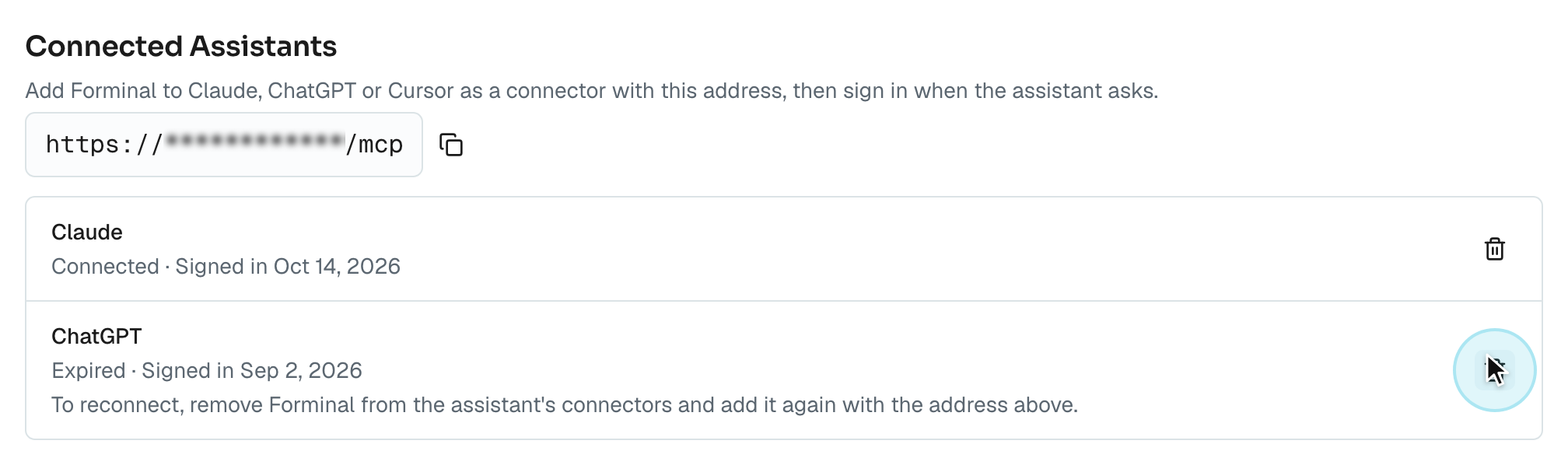
In Forminal, open Account menu » Profile » API keys. Under Connected Assistants, the client now reads Connected, with the day it signed in.
If it does not connect
- ChatGPT doesn’t use the tools: try a new conversation, type @ and pick Forminal.
- Requests fail or a tool you expect is missing: open Forminal in Plugins and select Refresh, then start a new conversation and pick it with @. If it still fails, check the connection in Forminal under Account menu » Profile » API keys, in Connected Assistants.
- Every request fails on authorization, or Connected Assistants shows ChatGPT as Expired: the sign-in has run out. Reconnect Forminal under Plugins in ChatGPT on the web.
- Deep research finds nothing in Forminal: it matches form titles, and only the newest 5,000 submissions on your 10 most recently changed forms. Use words that appear in the title or in the answers.
- You can’t find Add custom MCP server: check that you’re in ChatGPT on the web. In a workspace, its settings decide whether you can add one, so ask your workspace admin.
The MCP server guide lists every tool, and the full agent instructions explain Forminal to an agent that has never used it. Other clients are listed under Connect your AI. If you’re still stuck, contact support.
Frequently asked questions
Do I have to use ChatGPT on the web to add Forminal?
You add the custom MCP server in ChatGPT on the web. If you can’t find Add custom MCP server, check that you’re on the web version.
Will ChatGPT publish a form without asking me?
No. Before a tool changes something, such as publishing a form, ChatGPT asks you to confirm.
Why can’t I add a custom MCP server in my ChatGPT workspace?
In a workspace, its settings decide whether members can add one. Ask your workspace admin.
What if I ask ChatGPT for a feature my Forminal plan doesn’t include?
ChatGPT works on your plan. The change is still saved, and ChatGPT is told what the published form does instead, with a link to the plans on the pricing page, so it can pass both on to you.
Can ChatGPT read the submissions people sent?
It can search, read and summarize submissions, tag them, and export them as a CSV. Ask it something like how many people signed up through a form this week.
Can I use Forminal in ChatGPT deep research?
Yes. Deep research and company knowledge read Forminal through its search and fetch tools, which find forms by title and submissions by their answers or tags, and link each result back to Forminal. They only read, so build or change forms in a chat.
Does the Forminal plugin work in Codex?
Yes. A plugin you install in ChatGPT works in Codex too. You can also add the Forminal MCP server to the Codex CLI with two commands or the Forminal plugin.