
Forminal forms can take money now. Connect your Stripe account, add a Payment field, and people pay when they press Submit. The money goes straight into your own Stripe account, and payments work on every plan, including the free Lite plan.
What you can charge for
- A workshop where each ticket type in a Dropdown has its own price.
- A monthly membership, billed on a schedule.
- A donation, where people type the amount they want to give into a Number field.
- A deposit or an order with one fixed price.
How the amount is worked out
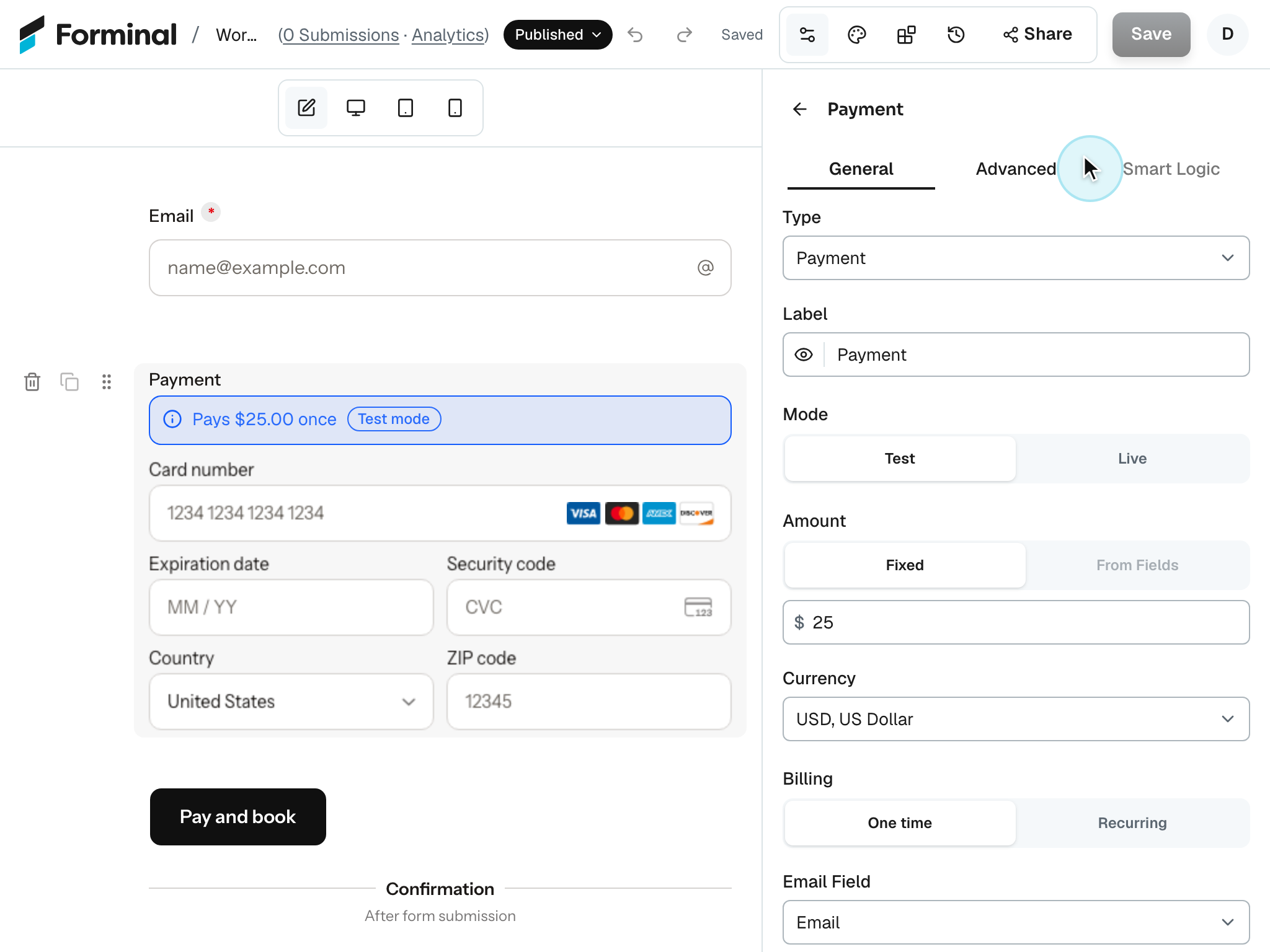
Set Amount to Fixed to charge the same amount every time. Set it to From Fields and the total adds up a Number field and the prices of the options people pick in Multiple Choice, Checkboxes or a Dropdown, updating as they answer. If the total needs tax or a discount, work it out with Calculations in a Number field and use that field as the amount.
Billing is One time or Recurring. A recurring payment repeats every so many days, weeks, months or years, with at most 3 years between charges, and it shows up in Stripe as a subscription.
How people pay
Card is always on, and it covers Apple Pay and Google Pay. On the field’s Advanced tab you can add Bank, Cash App Pay and Klarna. Bank and Cash App Pay take US dollars only, Klarna takes a short list of currencies, and only Card and Bank can bill a recurring payment. An embedded form takes card payments only.
Stripe sends the receipt to the address in the form’s Email field, so the form needs one before you can publish it. The payment box never asks for an email itself.
Try it before it goes live
A new Payment field starts in test mode, charging 10.00 USD once. Open Account menu » Integrations and select Connect with Stripe on the Test mode row, then publish the form and pay with one of Stripe’s test cards. When everything works, connect Live mode the same way and switch the field’s Mode to Live.
What you see afterwards
On the Submissions page, each paying submission gets a Payment column with the amount and a status such as Paid or Failed. Notification emails and integrations such as Google Sheets wait until Stripe confirms the payment, so you never hear about an order nobody paid for. Submissions caught as spam are never charged.
Refunds and disputes stay in your Stripe Dashboard. Open a submission and select View in Stripe to go straight to its payment. Stripe’s own fees apply to each payment.
Every setting is on the Payment page, and the setup, step by step, is in Take Payments with Stripe.
Create a free account and add a Payment field to your first form.